Why this comparison matters for your team
The AI coding assistant landscape has matured rapidly. Two years ago the question was whether to use AI tooling at all. Today, every serious engineering team is using at least one. The question now is which tools to standardise on, and how to use them in combination to maximise the productivity gains without introducing new technical debt or security risks.
At Agively, our engineers work across all three of the leading tools daily on client projects. This comparison is based on real usage patterns, not benchmark tests on toy problems.
Bottom line upfront: there is no single winner. The right tool depends on the task type, team workflow, and codebase context. Most senior engineering teams end up using all three in combination.
Head-to-head: the scorecard
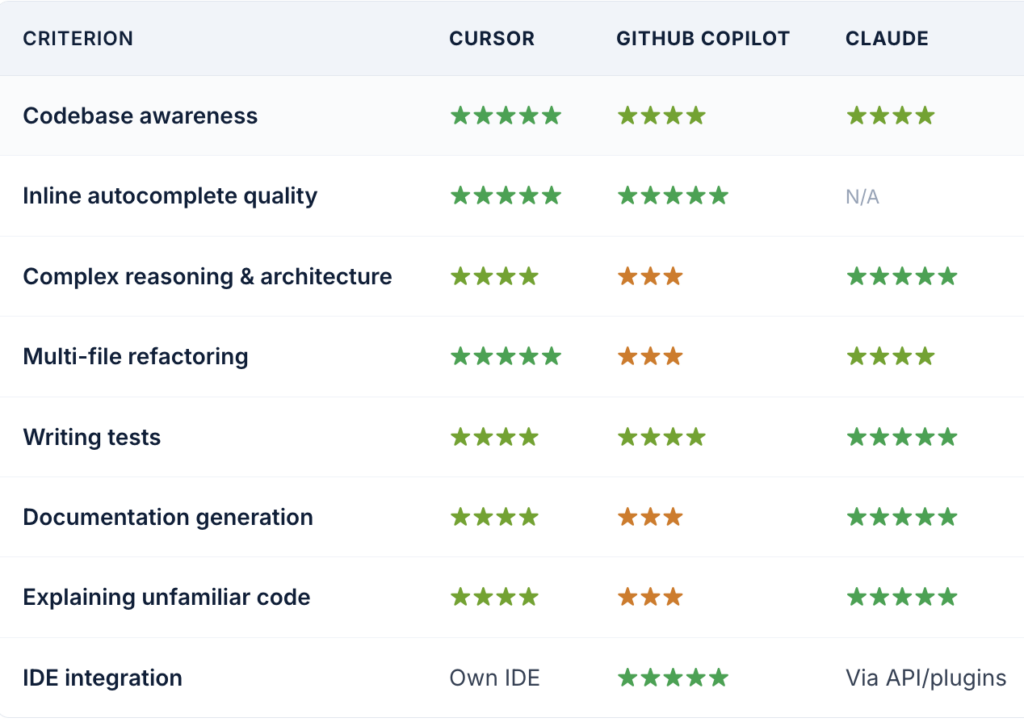
Our honest take on each tool
Cursor
Best for: whole-codebase tasks
What it does brilliantly: Cursor’s standout feature is codebase-wide context. It indexes your entire project and can make changes across multiple files simultaneously while understanding the relationships between them. For refactoring, feature additions across a large codebase, or debugging complex multi-file issues, nothing comes close.
Where it falls short: Cursor requires you to use its own editor (a VS Code fork), which is a workflow change for teams already set up in JetBrains or Neovim. The context window, while large, still has limits on very large monorepos.
GitHub Copilot
Best for: inline autocomplete
What it does brilliantly: Copilot remains the gold standard for line-by-line and block-level autocomplete. It integrates natively into VS Code, JetBrains, Neovim, and others with zero workflow disruption. For teams who want AI assistance without changing their editor, Copilot is the answer.
Where it falls short: Copilot’s chat and multi-file reasoning capabilities lag behind Cursor and Claude. It is an excellent autocomplete layer but a mediocre problem-solving partner.
Claude (Anthropic)
Best for: reasoning & architecture
What it does brilliantly: Claude is the most capable reasoning engine of the three. For complex architectural decisions, detailed code reviews, writing comprehensive test suites, generating documentation, explaining legacy code, and handling very long context windows (hundreds of thousands of tokens), Claude is consistently ahead. Our engineers use it as the “thinking partner” tool.
Where it falls short: Claude is not an IDE-native tool. You work with it via the web interface, API, or Claude Code CLI, which means copy-pasting code or using integrations. This friction limits its utility for fast inline development, though Claude Code is rapidly closing this gap.
The Agively recommended stack
After extensive real-world testing, here is the combination our engineering teams have standardised on:
PRIMARY
Cursor as the main editor for day-to-day development, codebase context and multi-file editing make it the highest-leverage daily driver.
SECONDARY
GitHub Copilot for engineers who prefer to stay in their existing editor, especially JetBrains users. The autocomplete quality alone justifies the cost.
REASONING
Claude for architectural decisions, code review, test generation, documentation, and any task requiring extended reasoning over large amounts of context.